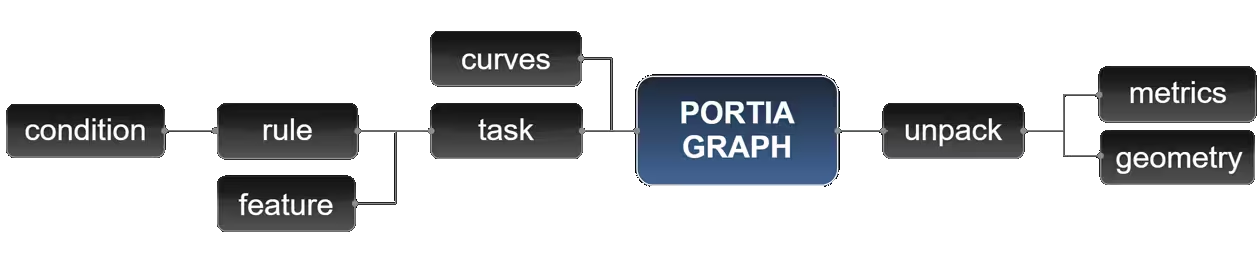
Here is a lightweight overview of the core concepts. All these are shown in the uploaded example files.
These are the most self-evident blocks of building Conditions. StringRelations (equals, not equals, contains, ..) and NumericRelations (smaller than, larger than, equals, not equals, ..).
Conditions are simple pass/fail tests for your geometry. They ask basic questions like "Is this curve longer than 5m?" or "Is this point inside the site?" without changing anything. They act as the raw filters that define which parts of your model qualify for the next step.
Features are data tags attached to your geometry. Instead of "dumb" lines, you get smart objects enriched with metadata like material, width, or custom IDs. This data stays baked into the graph, allowing you to bypass "data tree hell" and keep your logic stable.
Rules combine your Conditions using logic (AND/OR). While a Condition is a single question, a Rule is the final verdict. They pinpoint the exact nodes or edges you want to target, ensuring your commands hit the right spot with technical precision.
Tasks are the "doing" blocks. While Rules select the target, Tasks execute the work—assigning classifications, injecting Features, or verifying geometry. Stack them together to create an automated work order for the entire system.
Portia is the central engine. Plug in your raw curves and your list of Tasks, and it handles the rest. It converts geometry into a topological graph and executes your logic in the correct sequence, managing all the complex loops and structuring invisibly.
Unpack is your exit strategy back into standard Grasshopper. Portia keeps its data protected in specialized "wrappers" to prevent corruption; Unpack decodes it. Use these to extract points, curves, or Feature metadata to drive your downstream modeling.
Executes advanced solver logic on the graph. Solvers are specialized algorithms — like boundary generation, spot allocation, or sector creation — that consume the graph's features and topology to produce rich geometric outputs. This is where the heavy computational lifting happens.
A spatial enrichment Task that expands N-valent Nodes into daughter subgraphs. Each target node gets replaced by a ring of new nodes pushed outward along every adjacent edge's direction at a specified radius, then interconnected. Think of it as blooming a junction into a spatial diamond — perfect for resolving complex structural intersections into buildable geometry. Leaf nodes are rejected, and all adjacent edges must be longer than the radius.
An AI-powered Task that absorbs a structured AI response and translates it into executable graph operations. The AI parses natural language prompts into concrete Tasks, Rules, and Conditions, then Portia executes them on the fly. This is the bridge between human intent and graph manipulation — you describe what you want, and the system figures out how.
Creates new straight-line Edges between Rule-selected start and end Nodes. You provide one Rule for start nodes and one for end nodes, and Portia connects every start to every end. Optionally set an EdgeType for the new connections. Use this to add bracing, ties, or any new topology to the graph.
Splits selected Edges by inserting new Nodes at specified normalized parameters (between 0 and 1). The original edge gets replaced by shorter segments connected through the new nodes. Think of it as cutting a beam into pieces at exact locations. Parameters must be strictly between 0 and 1 — endpoints are off-limits.
The edge counterpart to SetNodeTypesByIndex. Assigns Type labels to Edges based on their Index order. Provide a list of Types, and Portia maps them sequentially. Ideal for batch-labeling edges after index assignment.
A convenience Task that assigns Type labels to Nodes based on their Index order. Instead of writing separate Rules for each node, you provide a list of Types and Portia maps them one-to-one by Index. Fast and clean for bulk categorization when your indices are already set.
Deletes Edges from the graph based on Rule-based selection. The nodes at each end remain — only the connection between them is severed. Use this to simplify topology, remove redundant connections, or clean up after other operations.
Deletes Nodes from the graph based on Rule-based selection. When a node is removed, its adjacent edges go with it. Use this to prune unwanted nodes — like trimming dead ends or cleaning up construction geometry. Be deliberate: once removed, they're gone.
A validation checkpoint for Edges. Selects edges with one set of Rules, then checks them against a second set of verification Rules. Any edge that fails the check gets flagged. Use this to enforce geometric or topological constraints — like ensuring all beams are above a minimum length.
A query Task for Edges. Uses your Rules to select specific Edges and exposes their geometry, identity, and connectivity as outputs. Nothing changes in the graph — it's purely a retrieval operation. Use it to extract edge data for visualization, analysis, or feeding into other Grasshopper components.
Enriches your Edges with custom Feature payloads. Same concept as SetNodeFeatures, but for edges. Attach metadata like width, rank, or any custom value to the edges that your Rules capture. Solvers and downstream components consume these features to drive complex logic.
Tags your Edges with text-based Type labels, just like SetNodeTypes does for nodes. Select edges with Rules, then assign them a category string like "Beam" or "Brace." This is the foundation for any logic that needs to distinguish between different kinds of structural members.
The edge counterpart to SetNodeIndices. Assigns numerical Index values to your graph's Edges using Rule-based selection. Use it to number, rank, or categorize edges — essential for tasks like ordering structural members or preparing edges for type assignment by index.
A validation checkpoint for your Nodes. You provide two sets of Rules: one to select the target Nodes, and another to verify them against. Portia checks whether the selected nodes satisfy the verification rules, flagging any that don't. It's your quality control step — making sure the graph is structurally or topologically sound before moving on.
A query Task that doesn't change your graph — it just asks questions. FilterNodes uses your Rules to spotlight specific Nodes, then exposes their geometry, identity, and adjacency data as outputs. Think of it as a search function: you describe what you're looking for, and Portia hands you the results.
Enriches your Nodes with custom data payloads called Features. Features are name-value pairs — like attaching a sticky note that says "Width = 300" to a specific node. Rules select which nodes get the data, and you define what gets attached. This is how you feed rich metadata into the graph for solvers and downstream components.
Tags your Nodes with text-based Type labels. This is how you give nodes a name or category — like calling one "Steel joint" and another "Timber connection." Rules pick the targets, and Portia writes the labels. Use this to classify nodes for filtering, visualization, or structural logic later on.
Assigns numerical Index values to your graph's Nodes. Think of it as labeling each node with a number — like numbering houses on a street. You select which nodes to target using Rules, and Portia stamps them with the indices you provide. Great for categorization, ordering, or preparing nodes for downstream logic.

Bálint Füzes
MSc Architect & Software Developer
I’m Bálint Füzes, MSc Architect and certified software developer. I support architects and engineering teams with modeling and computation - usually at the construction-near phase of projects.
My focus is the harmonious interplay of geometry and algorithms - to expand work-in-progress designs into logically lightweight, yet highly-detailed, fabrication-ready models.
Asset modeling.
Construction-ready BIM modeling for project-specific joints and connections.
Project support.
Portia integration and workflow setup for your team's active projects.
Intro sessions.
Graph-driven detailing sessions for offices getting started with.
Portia is created on 8 on Windows. Mac compatibility is not guaranteed due to .NET runtime differences — if you're on Mac, get in touch before committing.
No. The included examples work out of the box — open, replace the geometry, run. The graph operates underneath without requiring any direct interaction. If you want to go deeper and write custom conditions or rules, the architecture is there for it.
Yes — and that's the intended workflow. Portia is asset-agnostic. You bring your own detail models as Rhino geometry, register them as typed families, and Portia handles placement and orientation. Revit families need to be referenced to Rhino first, which is a standard pipeline in any BIM-adjacent workflow (with RIR). Similarly you can connect ArchiCad through LiveConnection or TAPIR, extract a grid and push the model coordinates back.
This is exactly where the graph engine earns its keep. Irregular grids, corner exceptions, slope changes and non-standard node configurations are handled through conditions and rules — you define the exception logic once and it propagates across the full topology.
The natural language layer routes through an external AI API, which requires an internet connection when using AI instructions. The core graph engine — conditions, rules, commands, asset mapping — runs entirely locally and works fully offline. AI prompting is optional, not a dependency.
No. The full core feature set is free — graph engine, asset mapping, conditions, rules, commands, and the complete example library. Advanced features currently in development will be introduced as an optional paid tier later. Nothing that works today will be removed or paywalled.
Yes. The graph engine is three-dimensional — orientation planes are computed in full 3D space, which means non-planar grids, folded surfaces and vertical facade substructures are all handled natively. The included examples focus on roof grids for clarity, but the underlying system has no planar restriction.
Get in touch.
Do you see an alignment or are you simply interested? Drop a line:
balint@fuzesarch.com
+36302980503
 Get in touch